Instantly Connector
Use Instantly data in dashboards or AI pipelines. Sync campaigns, leads, and analytics automatically.
Connect your Instantly account to AI pipelines and sync campaign data, leads, and analytics automatically.
Setup Instructions
1. Navigate to Data Integrations
Go to one of your flows, then click on the Data Integrations tab and select Select an Integration.
2. Select Instantly Integration
Search for Instantly in the list and click Connect.
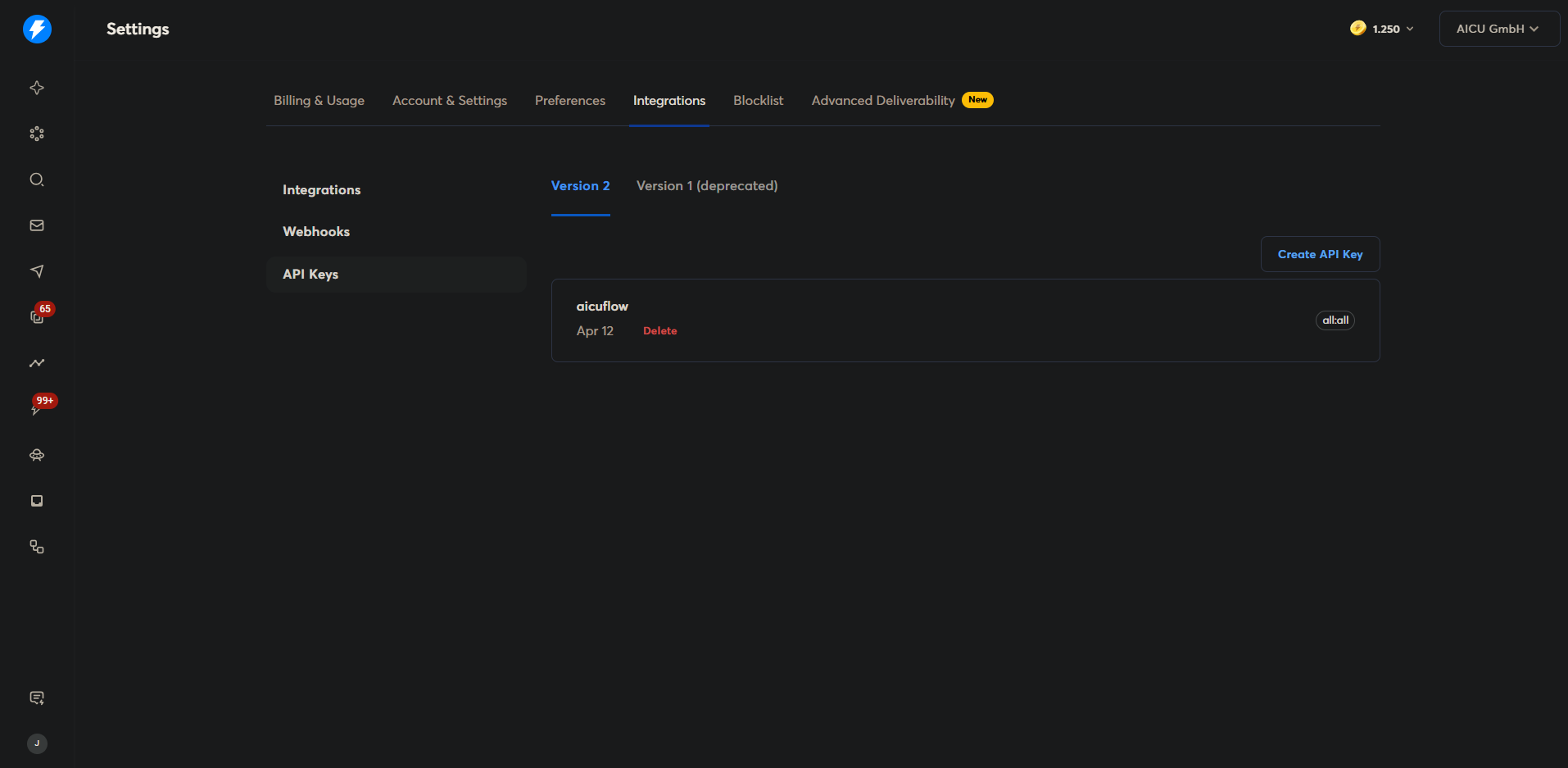
3. Create an API Key in Instantly
To connect Instantly, you need to create an API key:
- In Instantly, click on Settings in the sidebar
- Navigate to the Integrations tab
- Click on API Keys in the left sidebar
- Make sure you are on the Version 2 tab
- Click Create API Key
- Copy the generated API key
4. Configure the Connector
Back in the connector setup, fill in the following fields:
- Connector Name: Give your connector a descriptive name (e.g., "Instantly Campaigns")
- API Key: Paste the API key you copied from Instantly
Note: After you create the connector, you won't be able to view the API key again for security reasons. You can always update it if needed.
5. Create a Sync Job (Optional)
To automatically keep your Instantly data up to date, set up a sync job:
- Navigate to Data Synchronization and click the calendar icon
- Click Create Sync Job
- Select the Instantly connector you just created from the dropdown
- Give the sync job a descriptive name
- Choose a Sync Interval:
- Every 3 hours — suitable for most use cases
- Every minute — for near real-time needs (use cautiously)
- Custom — set your own schedule
- Click Save to activate the sync job
6. Monitor and Access Your Data
Check Import Status:
Navigate to Data Synchronization to monitor your import. You'll see whether the import succeeded or failed.
View Your Imported Data:
- Once the sync completes, go to File Manager (Data Management)
- Navigate to the folder where your data was stored
- Click any file to preview the data
- All records from your Instantly account will be available for use in your AI pipelines and dashboards
Important Notes:
- On every sync, a new version of your data is created
- Use a Version 2 API key — Version 1 keys are deprecated and will not work